
Automatic Invoicing: How It Works And Key Features Explained

Automated systems that create and manage invoices replace repeated manual steps with rule-driven processes. These systems can assemble line items, apply pricing rules, calculate taxes, and format documents for delivery without human entry at each cycle. Core elements often include templates, scheduled triggers, data sources for customer and product information, and connectors to payment methods. The objective in such systems is to reduce repetitive tasks while retaining control over accuracy and auditability.
Typical implementations link invoice creation to specific events or schedules: a time-based recurrence for subscriptions, a completion event for project milestones, or a payment reminder sequence tied to aging receivables. Data validation rules and approval gates may be included to prevent incorrect charges. Common output channels are email, downloadable PDFs, and secure portals; some systems also attach payment links or routing details to facilitate settlement. Security and logging functions tend to be integrated so each automated action is traceable.
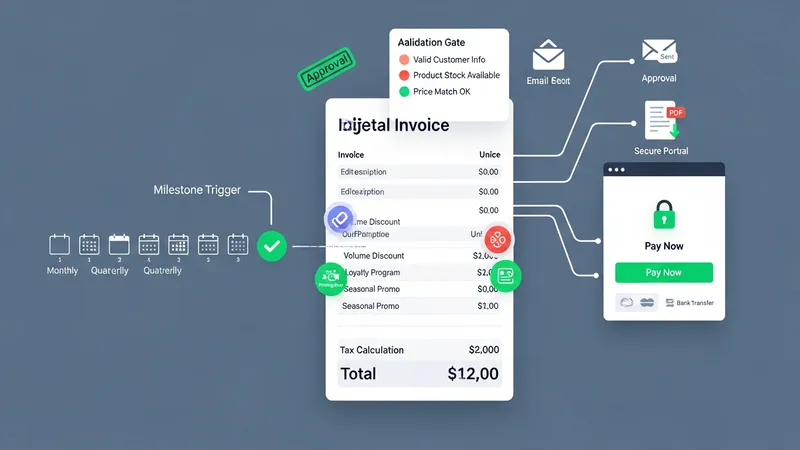
- Recurring subscription billing: schedules invoices automatically for periodic services, often including proration rules for mid-cycle changes.
- Event-triggered invoicing: generates invoices when a project milestone, shipment, or contract condition is recorded in an operational system.
- Tax and fee automation modules: apply jurisdictional tax rules, calculate rates, and adjust line items using rule engines or tax tables.
Invoice generation mechanics may combine templates with data mappings from order, project, or CRM systems. Templates typically define layout, standard terms, and required fields while data mappings populate line items, quantities, and unit prices. Validation layers can flag missing or inconsistent fields before dispatch. Where integration exists, invoice metadata may flow back into order records and accounting ledgers to maintain a single source of record. These flows often rely on APIs, webhooks, or batch data exports to synchronize systems.
Recurring billing setups can include options for billing frequency, proration, and trial periods, and they may support tiered pricing models. Billing schedules often include retry logic for failed payments and may generate dunning sequences to communicate unpaid balances. When subscriptions change mid-cycle, systems typically calculate prorated amounts and reflect them on subsequent invoices. Businesses may link recurring billing to customer ledger accounts to preserve historical balances and support collections workflows.
Tax calculation components often rely on configurable rule sets that map products and services to tax categories. A tax engine may reference geographic information, product classification, and exemptions to compute applicable taxes. Systems can support rounding rules, split tax responsibilities, and present tax breakdowns on invoices for clarity. For jurisdictions with reporting requirements, automated tools may produce summary reports or feed data to tax filing workflows, subject to local regulatory expectations.
Approval and accounts receivable processes can be incorporated into the automated flow to balance speed with oversight. Approval gates may require manual sign-off for large or atypical invoices, while lower-risk transactions proceed automatically. Automated posting to ledgers and reconciliation against payments can reduce manual accounting work but typically requires mapping and periodic review. Reporting functions often provide aging analyses, payment trends, and exception lists to help manage receivables and identify items needing intervention. The next sections examine practical components and considerations in more detail.